
Tailscale Proxy for desktop
A native menu-bar app for tsp. Start, stop, and watch your dev servers — and share them through one Tailscale URL — without touching a terminal.
Direct downloads from the latest release. Also see all releases .
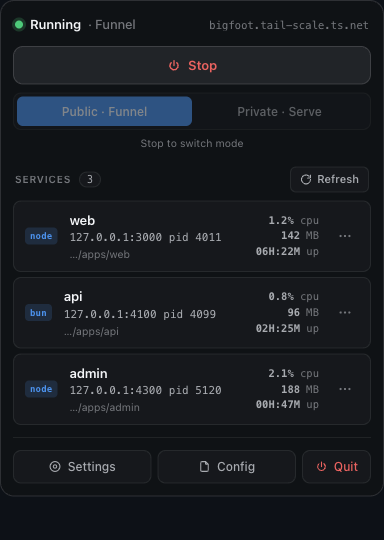
What it does
- Menu-bar first. Click the icon for a panel: live status, one-tap Start / Stop, and a Public · Funnel / Private · Serve switch.
- Sees every dev server. Each discovered service shows its runtime,
127.0.0.1:port, CPU / memory / uptime, and project folder — auto-refreshed. - Per-service actions. A
⋯menu on each row: open the local or public URL, open the project folder, copy info, or kill the process (with confirmation). - Guided setup. If Tailscale isn’t installed or signed in, the panel shows exactly what to do.
- Settings window for the full config (ports, runtimes, bind, mode, MagicDNS, …) plus Start at login.
It runs the exact same engine as the CLI and shares the same ~/.tailscale-proxy/config.json, so the app and tsp stay in sync.
Install
macOS
- Open the
.dmgand drag Tailscale Proxy into Applications. - The app isn’t notarized yet, so the first launch needs a one-time bypass —
right-click the app → Open → Open, or run:
xattr -dr com.apple.quarantine "/Applications/Tailscale Proxy.app" - It launches into the menu bar (no Dock icon). Click the icon to open the panel.
Windows
Unzip and run TailscaleProxy.exe. It’s unsigned, so SmartScreen may warn —
More info → Run anyway. The icon appears in the system tray.
Linux
tar xzf Tailscale-Proxy-Linux.tar.gz
sudo apt install libgtk-4-1 libwebkitgtk-6.0-4   # one-time runtime deps
./tailscale-proxy
The app needs Tailscale installed and signed in
(tailscale up). For public sharing, enable Funnel — see
Installation. Prefer the terminal? The
CLI does everything the app does.
Build from source
git clone https://github.com/meabed/tailscale-proxy
cd tailscale-proxy/desktop && go build -o tsp-app . && ./tsp-app
Needs Go 1.26+ and a C toolchain (Xcode CLT on macOS; libgtk-4-dev +
libwebkitgtk-6.0-dev on Linux). See desktop/README.md.